

GOF ECO · Multi-stage netlist ECO
A functional ECO shouldn't be solved three times. GOF runs the automatic ECO once on the pre-layout netlist, then reapplies the generated script to the DFT and post-layout netlists in minutes — with built-in LEC verifying every stage. The same patch that used to consume hours per stage now ships in a single, fast pass.
A functional change must land on three netlists before tape-out: the synthesis (pre-layout) netlist, the DFT netlist, and the post-layout netlist. With a traditional flow, each stage is solved from scratch — a full automatic ECO analysis run against a re-synthesized reference, every time. On a large design that is hours per stage, repeated three times, and the schedule slips with every iteration.
Parallel processing is not new: since V6.0, GOF splits the design into logic-cone and hierarchical-module packets and processes them simultaneously. Experiments show run speed improves by up to 5× on an 8-core server; . On the multi-million-gate SOCs where ECO runtime actually hurts, the single-script staged reuse below is what turns hours into minutes.
Same functional change, same multi-million-gate design — five ways to ship it. The times below are drawn from the published 2-million-gate benchmark and the documented RTL-guided ECO flow.
| Approach | Time on a multi-million-gate ECO | What you re-run at each netlist stage |
|---|---|---|
| Manual schematic ECO | ~8 hours | Hand-traced logic cones, repeated for pre-layout, DFT, and post-layout |
| Automatic ECO with full re-synthesis (incumbent) | ~2 days (24h+ re-synthesis, then ECO) | A full re-synthesis at every stage — the slowest part, three times over |
| GOF staged script reuse | One auto-ECO, then minutes to reapply to DFT + post-layout | Only the generated ECO script is replayed — no re-analysis |
| GOF RTL-guided ECO (no re-synthesis) | ~20 minutes (2M-gate case: under 30 minutes) | Nothing — re-synthesis is bypassed entirely |
| GOF AI (natural language) | Describe the ECO in English; the agent fixes the netlist and runs LEC | One instruction orchestrates the full GOF workflow |
The netlist ECO process in IC design involves navigating modifications across various design stages, each with unique characteristics. Typically, these stages include the Synthesis Netlist (or Pre-layout Netlist), the DFT Netlist, and the Post-layout Netlist. Each stage presents distinct requirements and challenges that necessitate a tailored approach to ECO implementation.
For smaller designs, a full re-synthesis can be applied to all three netlist stages. However, the time-intensive nature of a complete automatic ECO run across large designs necessitates a more efficient strategy. GOF ECO addresses this by focusing its automatic ECO capabilities on the initial Synthesis (Pre-layout) Netlist stage.
The workflow involves the following key steps:
Automatic ECO on Pre-layout Netlist: GOF ECO performs an automatic ECO and generates an output script based on the differences identified in the Synthesis Netlist and Pre-layout Netlist.
GOF ECO Output Script Generation: Once the Pre-layout Netlist is fixed, GOF ECO produces a script detailing the necessary modifications.
Write out ECO Perl script from pre-layout ECO:
# GOF ECO script, run_example.pl
use strict;
set_log_file("eco_pre_layout.log");
setup_eco("eco_pre_layout");# Setup ECO name
read_library("tsmc.5nm.lib");# Read in standard library
read_design("-ref", "reference.gv");# Read in Reference Netlist
read_design("-imp", "pre_layout.gv");# Read in Implementation Netlist Which is under ECO
set_top("topmod");# Set the top module
# No need to specify DFT constraint if no DFT logic is in the pre_layout netlist
fix_design();
report_eco(); # ECO report
check_design("-eco");# Check if the ECO causes any issue, like floating
write_verilog("eco_prelayout.v");# Write out ECO result in Verilog
write_perl("eco_prelayout.pl");# Write out ECO result in Verilog
gexit; # Exit when the ECO is done, comment it out to go to interactive mode when 'GOF >' appears
Applying the ECO script to the DFT and post-layout netlist:
use strict;
set_log_file("apply_script.log");
setup_eco("apply_script_pre2post");# Setup ECO name
read_library("art.5nm.lib");# Read in standard library
read_design("-imp", "postlayout.gv");# Read in Implementation Netlist Which is from backend
set_top("topmod");
run("eco_prelayout.pl"); # Apply the Perl script dumped in the previous pre-layout ECO
write_verilog("postlayout_eco.gv");
gexit;
Script Application to Downstream Netlists: This generated GOF ECO output script is then directly applied to the subsequent DFT Netlist and Post-layout Netlist.
The advantages of this approach are significant:
Enhanced Speed: Executing the GOF ECO output script is considerably faster than running a full automatic ECO analysis on each individual netlist stage. This drastically reduces the overall ECO turnaround time.
Simplified DFT Handling: By applying the script, there is often no need to explicitly specify DFT constraints during the fix of the DFT and Post-layout Netlists. The functional changes intended by the ECO are propagated without requiring re-analysis of DFT-specific logic.
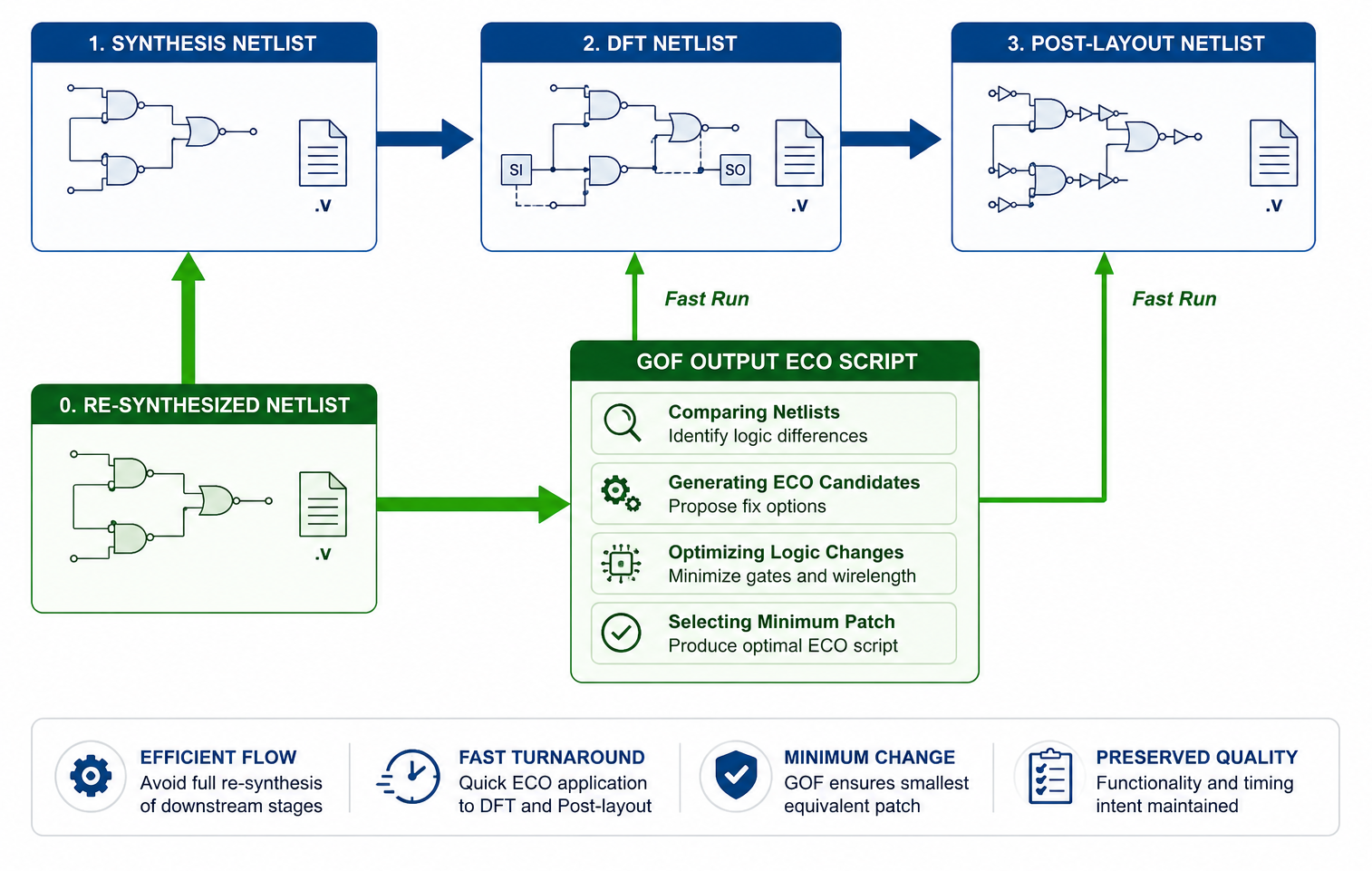
Figure 1: Efficient ECO Flow: Applying GOF ECO Output Script to Subsequent Netlist Stages
Addressing Back-end Optimization:
Occasionally, back-end tools perform significant optimizations on the original instances present in the Pre-layout Netlist. This can lead to discrepancies in instance naming and structure that might hinder the direct application of the GOF ECO output script. To overcome this, GOF Debug's schematic viewing capabilities provide a crucial advantage. Engineers can easily visualize the Pre-layout and Post-layout schematics, pinpoint the renamed or optimized instances, and make necessary adjustments to the GOF ECO output script to ensure accurate application.
Managing Isolation Cells in Post-Layout:
A critical consideration in Post-layout Netlists is the presence of isolation cells, which are typically inserted for power management and are absent in the Pre-layout Netlist. Consequently, the standard GOF ECO output script will not include these isolation cells. Directly applying the script might inadvertently bypass the intended behavior of these cells.
To address this, the latest GOF release introduces the set_check_isolation feature. When enabled, this intelligent functionality within GOF ECO analyzes the wires involved in the ECO script and determines if adjustments are needed to maintain the integrity of the isolation cells in the Post-layout Netlist. This ensures that the ECO modifications are applied while preserving the essential power management structures.
In conclusion, GOF ECO offers a streamlined and efficient approach to the IC ECO process by strategically applying automatically generated scripts to downstream netlist stages. Coupled with the debugging capabilities of GOF Debug and the intelligent isolation cell handling of the latest GOF release, this methodology significantly accelerates ECO execution, simplifies DFT considerations, and ensures the accurate implementation of design changes across the entire IC design flow.
RTL-guided ECO without re-synthesis eliminates the need for a full synthesis run, which is typically the most time-consuming step in the ECO flow. In many cases, RTL changes introduced during an ECO are incremental and do not justify re-running synthesis from scratch. GOF addresses this challenge by enabling ECO changes to be applied directly to the implementation netlist, bypassing re-synthesis entirely. As a result, ECOs on multi-million-gate netlists can be completed in as little as 20 minutes, compared to several days with a traditional re-synthesis-based approach.
In this flow, only the original RTL, the modified RTL, and the implementation netlist are required. GOF analyzes the differences between the reference RTL and the modified RTL, automatically generates the corresponding ECO operations, and applies them to the implementation netlist. This approach significantly reduces ECO turnaround time and engineering effort, resulting in a faster and more efficient ECO implementation.
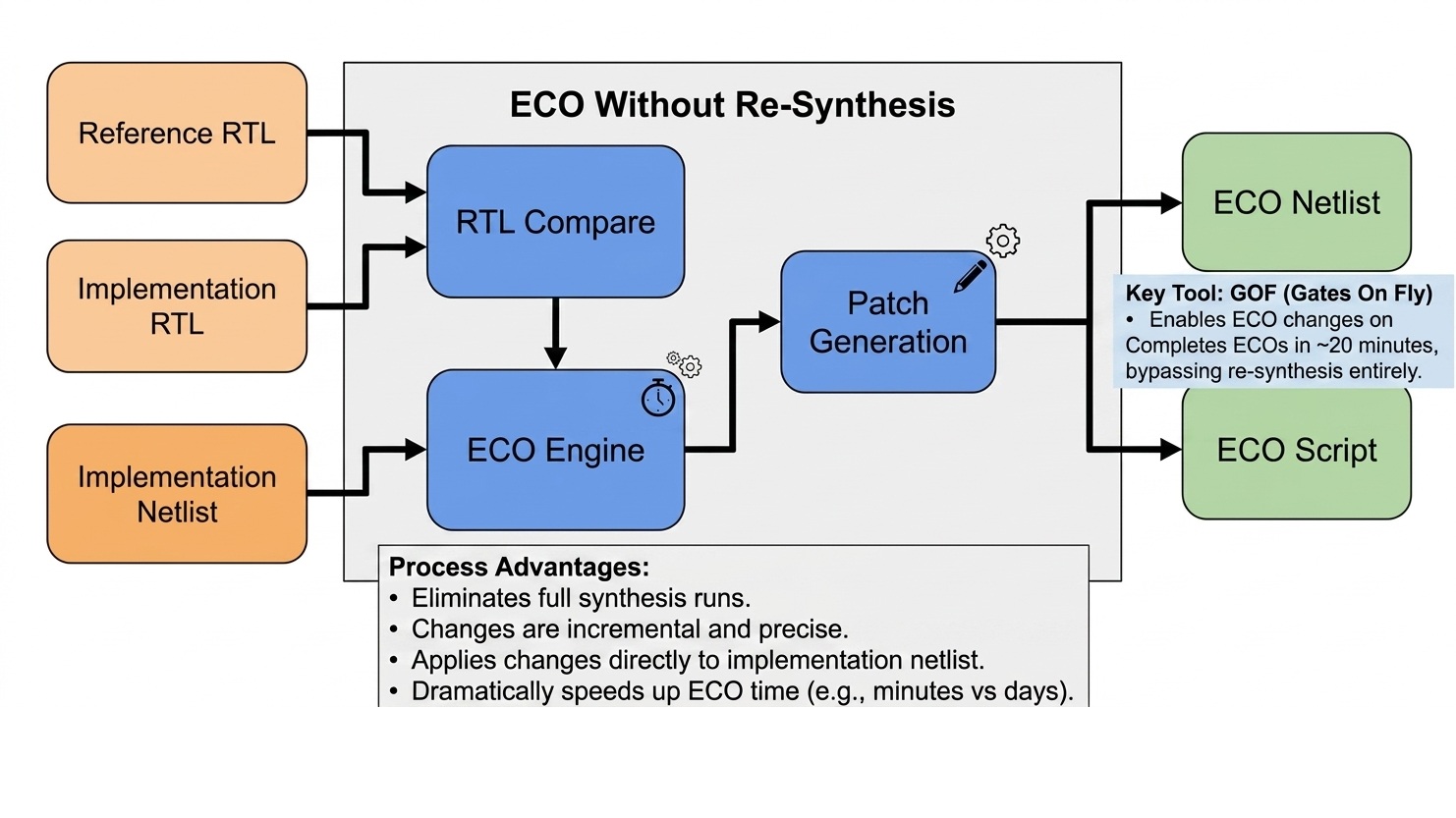
Figure 2: RTL Guided ECO Without Re-Synthesis
This method is particularly well suited for small to medium-sized ECOs, where design changes are localized and do not impact the overall structure of the design. By leveraging GOF’s robust RTL comparison, netlist analysis, and ECO generation capabilities, designers can rapidly implement functional changes without the overhead of a full synthesis flow.
Best practice is to apply the ECO to the pre-layout netlist first. The resulting ECO script can then be reused to update the DFT netlist and the post-layout netlist. This staged approach helps avoid boundary optimization and logic restructuring issues that often arise when ECOs are applied directly to post-layout netlists.
RTL Guided ECO without re-synthesis example script:
# GOF ECO script, rtl_eco_wo_syn.pl
use strict;
set_log_file("rtl_guided_wo_syn.log");
setup_eco("rtl_eco_wo_syn_example");# Setup ECO name
read_library("art.5nm.lib");# Read in standard library
set_define("SYNTHESIS");
set_define("NO_SIM");
set_inc_dirs("/project/nd900/vlib/include", "/project/nd900/IPS/include");
read_rtl('-ref', "ref0.sv", "ref1.sv", "ref2.sv");
read_rtl('-imp', "imp0.sv", "imp1.sv", "imp2.sv");
set_top("topmod");
rtl_compare();

read_svf("-imp", "syn.svf.txt");  # Optional, must be loaded before read_design, must be in text format
read_design("-imp", "prelayout.gv");# Read in Implementation Netlist Which is under ECO
set_top("topmod");# Set the top module
# Preserve DFT Test Logic
set_ignore_output("scan_out*");
set_pin_constant("scan_enable", 0);
set_pin_constant("scan_mode", 0);
fix_design();
report_eco(); # ECO report
check_design();# Check design for issues such like floating
write_perl("eco_wo_syn.pl");# Write out ECO result to Perl script
write_verilog("eco_verilog.gv");# Write out ECO result in Verilog
exit; # Exit when the ECO is done, comment it out to go to interactive mode when 'GOF >' appears
After generating the ECO Perl script, it can be applied to the DFT and post-layout netlists.
Applying the ECO script to the post-layout netlist:
use strict;
set_log_file("apply_script.log");
setup_eco("apply_script_pre2post");# Setup ECO name
read_library("art.5nm.lib");# Read in standard library
read_design("-imp", "postlayout.gv");# Read in Implementation Netlist Which is from backend
set_top("topmod");
run("eco_wo_syn.pl");
write_verilog("postlayout_eco.gv");
exit;
In many scenarios, it is unnecessary to provide the full RTL for comparison. If the ECO impacts only a specific sub-module, GOF can limit the RTL comparison to that module. Designers can specify the hierarchical instances to be updated using set_path_prefix.
For example, if the RTL modification affects SUB_MOD_A, and the change needs to be applied to two instances 'u_sub_mod1/u_sub_mod_a' and 'u_sub_mod3/u_sub_mod_a_1' only the sub-module RTL files are required. GOF applies the ECO selectively to the specified hierarchical paths.
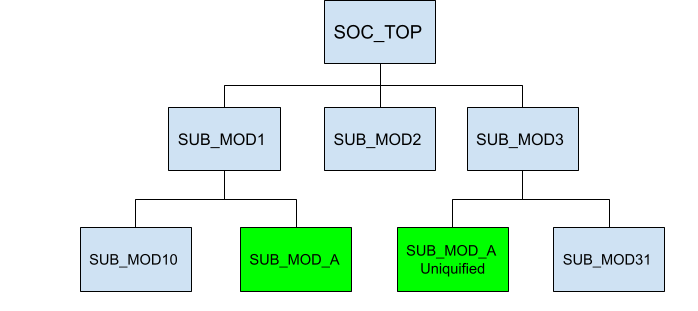
Figure 3: RTL Compare on Sub-module
RTL guided ECO with sub-module only:
# GOF ECO script, rtl_eco_wo_syn.pl
use strict;
set_log_file("rtl_on_sub.log");
setup_eco("rtl_on_sub_mod");# Setup ECO name
read_library("art.5nm.lib");# Read in standard library
set_path_prefix("u_sub_mod1/u_sub_mod_a", " u_sub_mod3/u_sub_mod_a_1");
read_rtl('-ref', "SUB_MOD_A.modified.v");
read_rtl('-imp', "SUB_MOD_A.v");
set_top("SUB_MOD_A");
rtl_compare();

read_svf("-imp", "syn.svf.txt");  # Optional, must be loaded before read_design, must be in text format
read_design("-imp", "prelayout.gv");# Read in Implementation Netlist Which is under ECO
set_top("SOC_TOP");# Set the top module
# Preserve DFT Test Logic
set_ignore_output("scan_out*");
set_pin_constant("scan_enable", 0);
set_pin_constant("scan_mode", 0);
fix_design();
report_eco(); # ECO report
check_design();# Check design for issues such like floating
write_perl("eco_wo_syn.pl");# Write out ECO result to Perl script
write_verilog("eco_verilog.gv");# Write out ECO result in Verilog
exit; # Exit when the ECO is done, comment it out to go to interactive mode when 'GOF >' appears
RTL-guided ECO without re-synthesis is an efficient and scalable approach for implementing functional ECOs with minimal turnaround time. By directly comparing original and modified RTL and applying the resulting changes to the implementation netlist, GOF enables fast, controlled, and repeatable ECO execution. The ability to scope ECOs down to specific sub-modules further enhances productivity, making this flow especially effective for localized design updates late in the design cycle.
RTL-guided ECO is also what lets an LLM fix the netlist directly. Because GOF can compare RTL and apply the change without re-synthesis, an AI agent can take a plain-English ECO instruction, drive the GOF engines, and produce a verified patch in one pass. In the published case, the AI-generated patch was ~30% smaller than the output of standard automated ECO — AI reasoning matched the finesse of an experienced engineer doing a manual “surgical” fix.
When the post-layout netlist has been optimized and instances are renamed, the same AI reads both the pre-layout and post-layout netlists and maps the original instance and net names to their new names, so the staged ECO script keeps applying cleanly.
examples/auto_eco benchmark yourself, or run your ECO with GOF.