Go back to
GofViewer TopCreate Waveform Restore File.
- GOF can save Waveform Restore File for waveform viewer tool to restore some signals on waveform display window.
- Current tools supported are Verdi(nWave) and GTKWave.
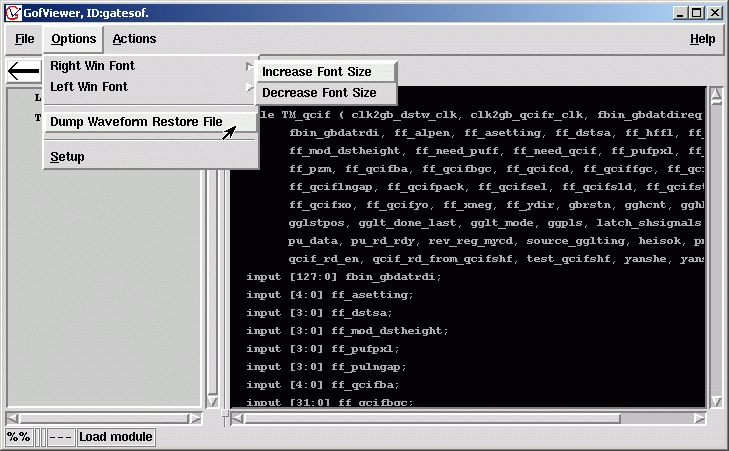
- Setup method: GofViewer->Options->'Dump Waveform Restore File'
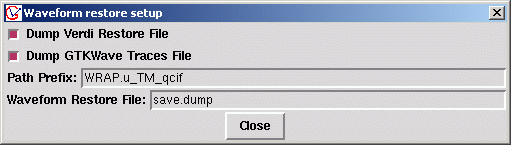
- A window pops up for Waveform resstore setup.
- You can choose to dump Veridi Restore File or GTKWave Traces File.
- In the 'Path Prefix' entry, fill in prefix needed to be added at the beginning of singal.
- The signal path in GOF can be different from the signal path in waveform file by this prefix.
- For example, the signal "strbltcmd" in GOF has name as "top.testop.strbltcmd" in the waveform file.
- Fill in file name in 'Waveform Restgore File' entry.
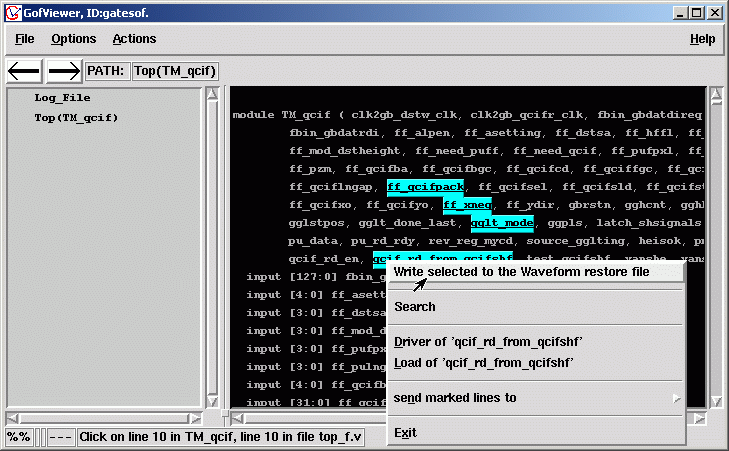
- Mouse click on the wire you want to save. The wire is highlited which means it is selected.
- Press 'Ctrl' key, and mouse click on other nets to select more.
- Mouse-right-click to pop up menu. Select 'Write selected to the Waveform Restore File'.
- Restore File is created, the following is GTKWave Traces File format.
<?XML version "1.0"?>
<!-- GTKWAVE saved traces, create by GOF
<!-- at Mon Sep 11 17:47:57 2006
<config>
<traces>
<trace name=" WRAP.u_TM_qcifff_xneg" mode="bin" rjustified="yes" selected="yes">
<signal name=" WRAP.u_TM_qcifff_xneg"/>
</trace>
<trace name=" WRAP.u_TM_qcifff_qcifpack" mode="bin" rjustified="yes" selected="yes">
<signal name=" WRAP.u_TM_qcifff_qcifpack"/>
</trace>
<trace name=" WRAP.u_TM_qcifqcif_rd_from_qcifshf" mode="bin" rjustified="yes" selected="yes">
<signal name=" WRAP.u_TM_qcifqcif_rd_from_qcifshf"/>
</trace>
<trace name=" WRAP.u_TM_qcifgglt_mode" mode="bin" rjustified="yes" selected="yes">
<signal name=" WRAP.u_TM_qcifgglt_mode"/>
</trace>
</traces>
</config>
The following is Verdi Restore File format.
addSignal -h 15 WRAP/u_TM_qcifff_xneg
addSignal -h 15 WRAP/u_TM_qcifff_qcifpack
addSignal -h 15 WRAP/u_TM_qcifqcif_rd_from_qcifshf
addSignal -h 15 WRAP/u_TM_qcifgglt_mode
- In the corresponding waveform display tool, select Restore Waveform option, and pick the file you just generated.
- The signals you have interest will be displayed on waveform window.
Follow us:



© 2026 NanDigits Design Automation. All rights reserved.
