The use case shows how to automatically fix the implementation netlist to make it equal to the reference netlist.
The "fix_design" command runs an Equivalence Check on the top module and its sub-modules between the implementation and reference netlist. Non-equivalent points are located. A minimum number of gate patch is created and applied to the implementation netlist to make it equal to the reference netlist.
Users provide Implementation netlist which is under ECO, Reference netlist which is re-synthesized after RTL modification and the name of top level module that contains the changes.
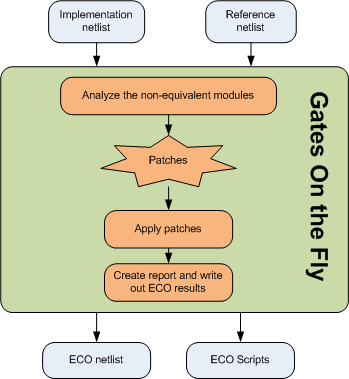
The internal Logic Equivalent Check engine finds and analyzes the non-equivalent modules and figures out the minimum logic patches to fix the Implementation netlist.
# GofCall ECO script, auto_eco.pl
use strict;
undo_eco;  # Discard previous ECO operations
setup_eco("eco_example");  # Setup ECO name
read_library("art.90nm.lib"); # Read in standard library

# Read in the Reference Netlist which is re-synthesized with several modules modified
read_design("-ref", "reference.gv");
# Read in the implementation Netlist Which is under ECO
read_design("-imp", "implementation.gv");

set_top("topmod"); # Set the top module
set_ignore_output("TEST_SO*"); # To avoid test lockup to affect the ECO result
set_pin_constant("TEST_EN",0); # To avoid test logic being touched

# Fix the top module and its sub-modules
fix_design;

report_eco();  # ECO report
write_verilog("eco_verilog.v"); # Write out ECO result in Verilog
write_soce("eco_soce.tcl"); # Write out TCL script for SOC Encounter

exit; # Exit when the ECO is done, comment it out to go to interactive mode when 'GOF >' appears
The above script can be run by '-run' option in GOF command line:
The example is in the released package.
To run the example:
The log file shows there are total 35 gates in the initial logic cone. After optimization, the patch has only 1 complex cell and 8 inverts



