This use case shows how to use Gates On the Fly to find optimized away wires in netlist and do ECO on them. Wire names in RTL codes are normally optimized away in synthesis process. It makes manual ECO very difficult even the ECO changes in RTL codes are very small. One method GOF provides is to use the fully interactive incremental schematic which makes it easy to trace fanin fanout of logic. In this use case, we demonstrate how to use the build-in Logic Equivalence Check engine to find the renamed wires in the netlist.
An ECO changes a case statement in RTL code as following,
RTL code before ECO
always @(*) begin
  if(enable)begin
    case (ctrl_bits[11:0])
      12'h01f : next_data[8:0] = cnt_0[8:0];
      12'h03f : next_data[8:0] = cnt_1[8:0];
      12'h07f : next_data[8:0] = cnt_2[8:0];
      12'h0ff : next_data[8:0] = cnt_3[8:0];
      12'h1ff : next_data[8:0] = cnt_4[8:0];
      12'h3ff : next_data[8:0] = cnt_5[8:0];
      12'h7ff : next_data[8:0] = cnt_6[8:0];
      12'hfff : next_data[8:0] = cnt_7[8:0];
      default : next_data[8:0] = 9'h0;
    endcase
  end
  else begin
    next_data[8:0] = start ? cnt_8[8:0] : 9'h0;
  end
end
RTL code after ECO
always @(*) begin
  if(enable)begin
    case (ctrl_bits[11:0])
      12'h21f : next_data[8:0] = cnt_0[8:0];
      12'h03f : next_data[8:0] = cnt_1[8:0];
      12'h27f : next_data[8:0] = cnt_2[8:0];
      12'h0ff : next_data[8:0] = cnt_3[8:0];
      12'h1ff : next_data[8:0] = cnt_4[8:0];
      12'h3ff : next_data[8:0] = cnt_5[8:0];
      12'h7ff : next_data[8:0] = cnt_6[8:0];
      12'hfff : next_data[8:0] = cnt_7[8:0];
      default : next_data[8:0] = 9'h0;
    endcase
  end
  else begin
    next_data[8:0] = start ? cnt_8[8:0] : 9'h0;
  end
end
The ECO is to find the two specific cases and manually change the logic with minium gate number. So we have to find the wires that represent the two cases.
Create a new RTL to have specific wire names to represent the cases
...
 // Put the specific net in output port, so that it won't be optimized away
 output reg [9:0] preserve_nets;
 always @(*) begin
  preserve_nets = 'h0;
  case (state)
    `COUNT: begin
      case (packet_ctrl[11:0])
        12'h21f : preserve_nets[0] = 1;
        12'h03f : preserve_nets[1] = 1;
        12'h27f : preserve_nets[2] = 1;
        12'h0ff : preserve_nets[3] = 1;
        12'h1ff : preserve_nets[4] = 1;
        12'h3ff : preserve_nets[5] = 1;
        12'h7ff : preserve_nets[6] = 1;
        12'hfff : preserve_nets[7] = 1;
        default : preserve_nets[8] = 1;
        endcase
      end
    default: begin
      preserve_nets[9] = 1;
    end
 end
 ...
Bringup Schematic with gates driving 'preserve_nets' in the reference RTL
   #Example code to bringup GUI window and schematic
   read_library("hvt.lib", "svt.lib");
   read_rtl("-ref", "reference.v");
   read_design("-imp", "implement.v");
   set_top("topmod");
   preserve_modules("-all");
   elaborate;
   start_gui;
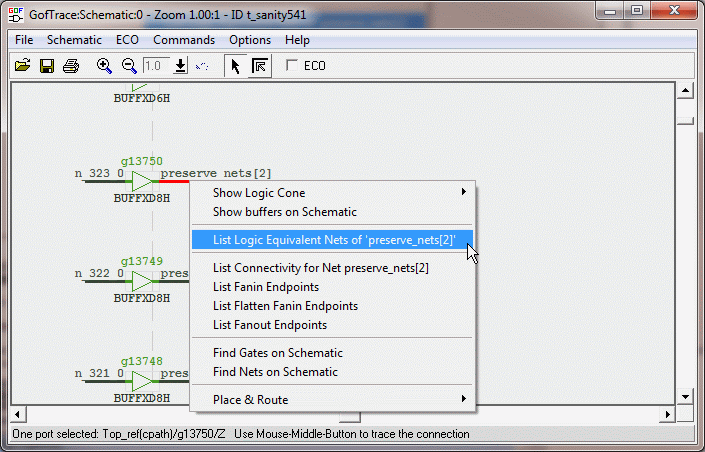
Figure 1. Find equivalent nets
Activate Finding Logic Equivalent Nets
Select pin that drives 'preserve_nets', click mouse-right-button to popup menu, select 'List Logic Equivalent Nets' command. A popup window displays the nets in implementation netlist that are equal or inverted to the net in comparison
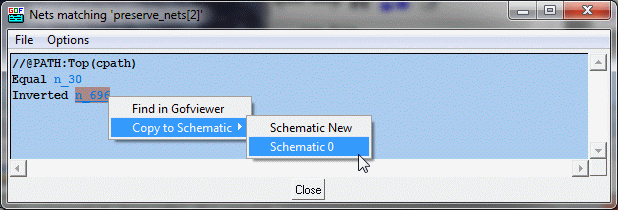
Figure 2. List Equivalent and Inverted nets for 'preserve_nets[2]'
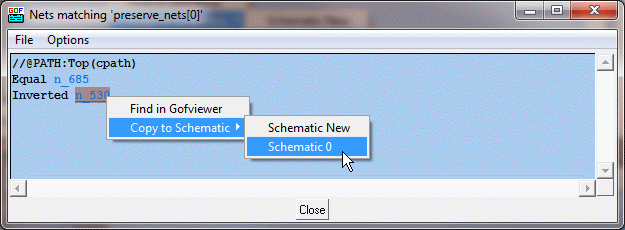
Figure 3. List Equivalent and Inverted nets for 'preserve_nets[0]'
Analyze and do ECO correspondingly
From the RTL change above, net 'packet_ctrl[9]' should be inverted to driven instance 'p76429A'. However, after fanin/fanout tracing, we find that the instance drives two other instances 'p54164A' and 'p76597A' who should keep 'packet_ctrl[9]' NOT inverted. So three instances, 'p76429A', 'p54192A' and 'p76420A' should be cloned and drive 'p54164A' and 'p76597A'.
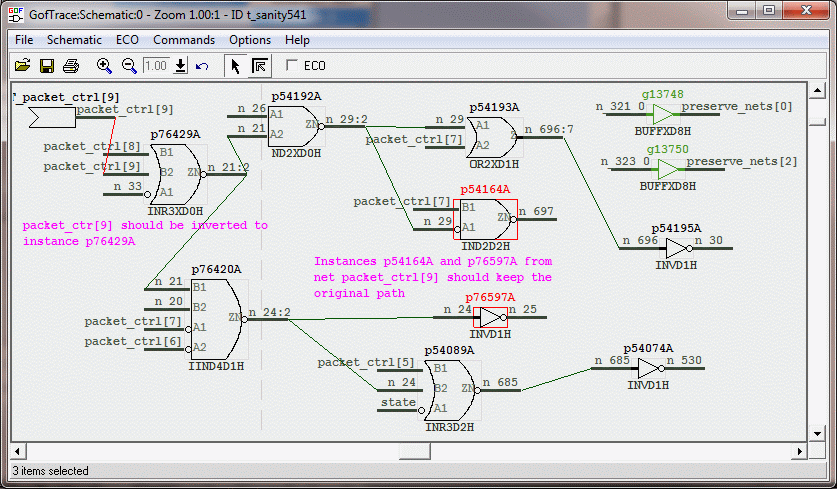
Figure 4. Incremental schematic for related ECO logic
ECO Script
The ECO can be done in GUI mode, see this GUI ECO example.
GofCall Script to do the ECO is listed below, click the ECO API for detail API usage
# GofCall ECO script to fix case statement ECO, ECO Name: eco_9877 File Name: fix_case.pl
undo_eco;
setup_eco("eco_9877");
new_gate("n_21_eco_9877_clone", "INR3XD0H", "p76429A_eco_9877_clone",
         ".A1(p76429A/A1),.B1(p76429A/B1),.B2(p76429A/B2)");
new_gate("n_24_eco_9877_clone", "IIND4D1H", "p76420A_eco_9877_clone",
         ".A1(p76420A/A1),.A2(p76420A/A2),.B1(n_21_eco_9877_clone),.B2(p76420A/B2)");
new_gate("n_29_eco_9877_clone", "ND2XD0H", "p54192A_eco_9877_clone",
         ".A1(p54192A/A1),.A2(n_21_eco_9877_clone)");
change_pin("p54164A/A1", "n_29_eco_9877_clone");
change_pin("p76597A/I", "n_24_eco_9877_clone");
change_pin("p76429A/B2", "INVD1H", "", "-");
write_verilog("implementation_eco_9877.v");
Apply the script
Verify the ECO
After the script is applied, in GOF shell command entry, enter 'sch("p76429A")'. When the schematic window is up, do fanin/fanout trace. We can see from Figure 5 that the ECO is done correctly
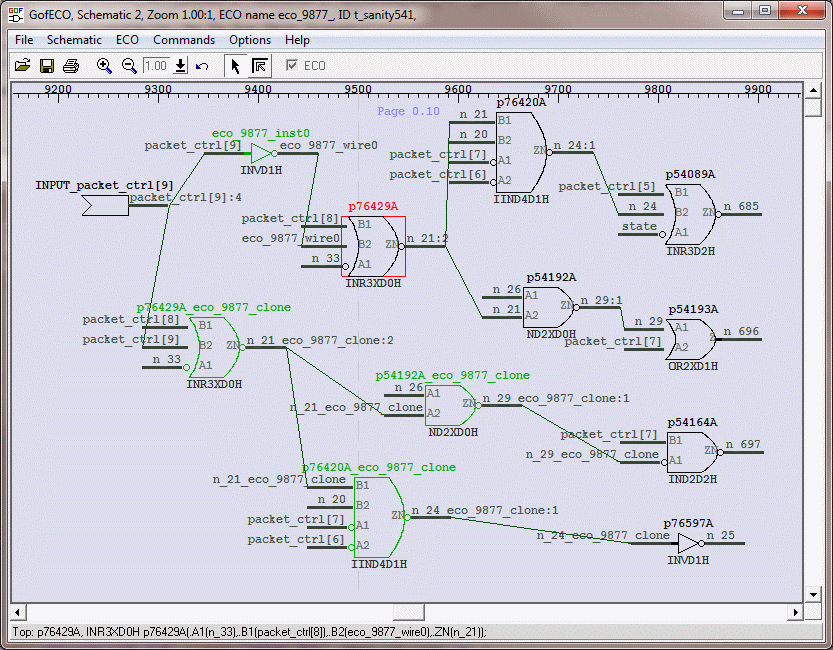
Figure 4. Incremental schematic for related ECO logic'
Check another exmaple here



